Archiving a Revit project sounds like a simple task. Open the model, save a copy and place it in an archive folder.
For a small standalone model, that may sometimes be enough. For a live Revit Server project containing workshared models and links, it is not a particularly dependable process.
An archive is intended to become the historical record of a project at a particular point in time. It should be complete, understandable and separate from the live working environment. If it is ever needed again, someone should be able to identify what was archived, when it was created and whether the process completed successfully.
Developing the archive workflow for Flow Server has shown us how much practice knowledge sits behind those apparently straightforward requirements.
An archive is not just another copy
A Revit Server project is not managed in quite the same way as an ordinary file on a shared drive. The live model belongs to a particular Revit release and may form part of a coordinated collection of central models. Its links, worksharing state and server location all contribute to how the project operates.
Simply copying whatever can be seen in a folder does not necessarily create a useful project record. The archive needs to be produced through the correct version of Revit, saved to a suitable destination and checked as part of a defined process.
This distinction matters because an archive has a different purpose from a backup.
A backup helps recover from a recent problem. It may be overwritten or rotated as new backups are created. An archive is a deliberate milestone: a retained project state that may need to remain understandable years later.
The two are related, but they should not be treated as interchangeable.
A backup helps recover from a recent problem. An archive is a deliberate project record that may need to remain understandable years later.
Starting with the correct Revit version
The first challenge is knowing which application should perform the archive.
Our Revit Server environment supports several releases of Revit. A project created in Revit 2025 should be opened and archived by Revit 2025; it should not be silently upgraded simply because a newer release happens to be installed on the workstation.
Flow Server therefore needs to identify the source server version and connect the archive request with the matching Revit application. The desktop interface can prepare and monitor the operation, but Revit itself still needs to open and save the model correctly.
This led to the development of version-specific worker processes. Flow Server prepares a structured archive request and launches the appropriate installed Revit application. A small Flow worker running inside Revit carries out the model operation and returns a result to the main application.
The technical arrangement is less important than the principle behind it: the management interface should coordinate the workflow without pretending that a Revit model is an ordinary document that can always be manipulated safely outside Revit.
A project may be a set of models
Many architectural projects contain more than one Revit model. A main building model may be linked to a topographical model, another building, a separate interior model or consultant information.
Archiving only the model selected by the user could produce an incomplete record. At the same time, automatically collecting every referenced file can create a different problem. Links may point to consultant locations, obsolete files or paths outside the practice’s project structure. Some references may be deliberately excluded from the archive, while others may be essential to understanding the project.
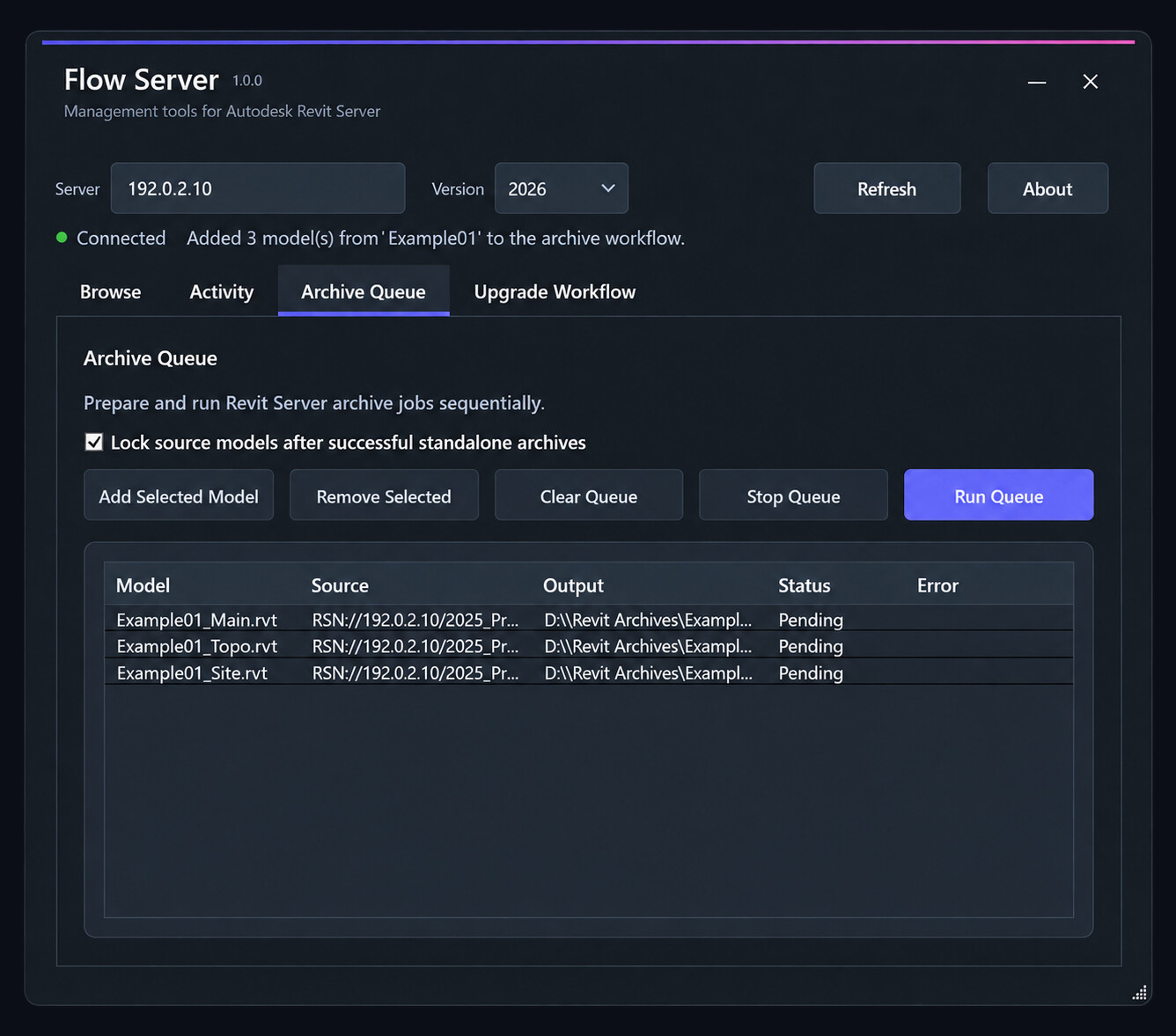
This is where a practice-aware tool can do more than a generic file operation. It can identify the models within the selected server project, present the proposed archive set and retain a result for each item.
The goal is not to claim that every external reference can be resolved automatically. It is to make the boundaries of the archive visible. A user should be able to see what is being included and recognise when something sits outside the expected project structure.
Choosing where the archive belongs
The archive destination is another decision that needs to be explicit.
Our projects do not all reach the archive stage under identical circumstances. A routine project close-out may have a standard destination, while a model being prepared for an upgrade may need a controlled working archive as part of that process.
Flow Server therefore distinguishes between the archive operation and the archive location. For a standalone archive, the user can select the appropriate destination. For an upgrade workflow, a predictable default location can help keep the sequence coordinated and reduce opportunities for individual models to become separated.
Whichever method is used, the application should show the destination before the operation begins and report the final saved location afterwards. An archive that exists somewhere but cannot be found confidently is of limited practical value.
Success needs to be demonstrated
One of the most important lessons from developing the workflow is that starting Revit is not the same as completing an archive.
The application may launch successfully while a particular model fails to open. Revit may encounter a warning or dependency that requires attention. One model in a linked set may complete while another does not. A destination may be unavailable, or the workstation may not contain the expected Revit installation.
A dependable process must return meaningful results rather than assume success because no obvious error appeared on screen.
For each archive job, Flow Server needs to know:
- which model was requested;
- which Revit version was used;
- where the archived model was written;
- whether the operation completed;
- what error was returned if it failed; and
- whether the overall project archive can be regarded as complete.
This becomes particularly important when the archive is the prerequisite for another operation. An upgrade should not proceed merely because most of the models archived successfully. If an essential model failed, the safest response is to stop, preserve the available results and explain what needs attention.
Protecting the historical copy
Once an archive has been created, there is still a human problem to solve: someone may open it later and mistake it for the active project.
Folder names and warning notes help, but they are easy to overlook. Our current approach is to make completed standalone archives read-only. This adds a small amount of friction if someone tries to continue working directly in the archived files.
The intention is not to lock information away permanently. If an archived model genuinely needs to become active again, the normal response would be to save it into a new working location and establish it as a new project state. The historical copy can then remain unchanged.
The archive should remain usable, but its status as a historical record should be unambiguous.
This is deliberately a light-touch safeguard. Too much restriction can frustrate users and encourage workarounds. Too little protection makes it easy for the archive record to be altered accidentally. Read-only protection creates a useful pause without making the information inaccessible.
Flow Server also provides a deliberate way to remove that protection when required. The important distinction is between an intentional action and an accidental edit.
Designing for imperfect projects
Clean demonstration models are useful during development, but real project archives expose much more valuable information.
Older models may link to a former staff member’s desktop. Survey files may sit outside the current folder structure. Projects created under earlier office standards may not resemble today’s project setup. Some links are important; others are remnants that no longer contribute anything useful.
It would be easy to treat every unexpected condition as a software error. In reality, these conditions are part of the project history. A good archive tool needs to distinguish between a problem that makes the archive unsafe and an irregularity that should simply be reported.
That judgement cannot always be automated. Flow Server can identify paths, collect results and prevent an unsafe sequence from continuing, but the practice still needs to decide what belongs in the formal project record.
Making the correct process repeatable
The purpose of Flow Server’s archive workflow is not merely to reduce the number of clicks involved. It is to turn an informal sequence into a repeatable practice process.
That means using the correct Revit version, recognising that a project may contain several coordinated models, making the destination explicit, recording individual results and protecting the completed archive from accidental change.
The process is still being tested across the kinds of projects that accumulate in a working architectural practice. Each unusual link and older folder structure helps expose another assumption that needs to be made visible.
That is useful development work. A reliable archive is not defined by how quickly a model can be copied. It is defined by whether the practice can later trust the record that was created.
In the next article in this series, we look at how that trusted archive becomes the foundation for upgrading a complete Revit Server project without losing its history.
Continue the Flow Server development series
Read the first article: Making Revit Server Work Better for a Small Practice →
Read the next article: Upgrading a Revit Server Project Without Losing Its History →
Want to explore Flow Server in more detail?